⚙️ System Settings
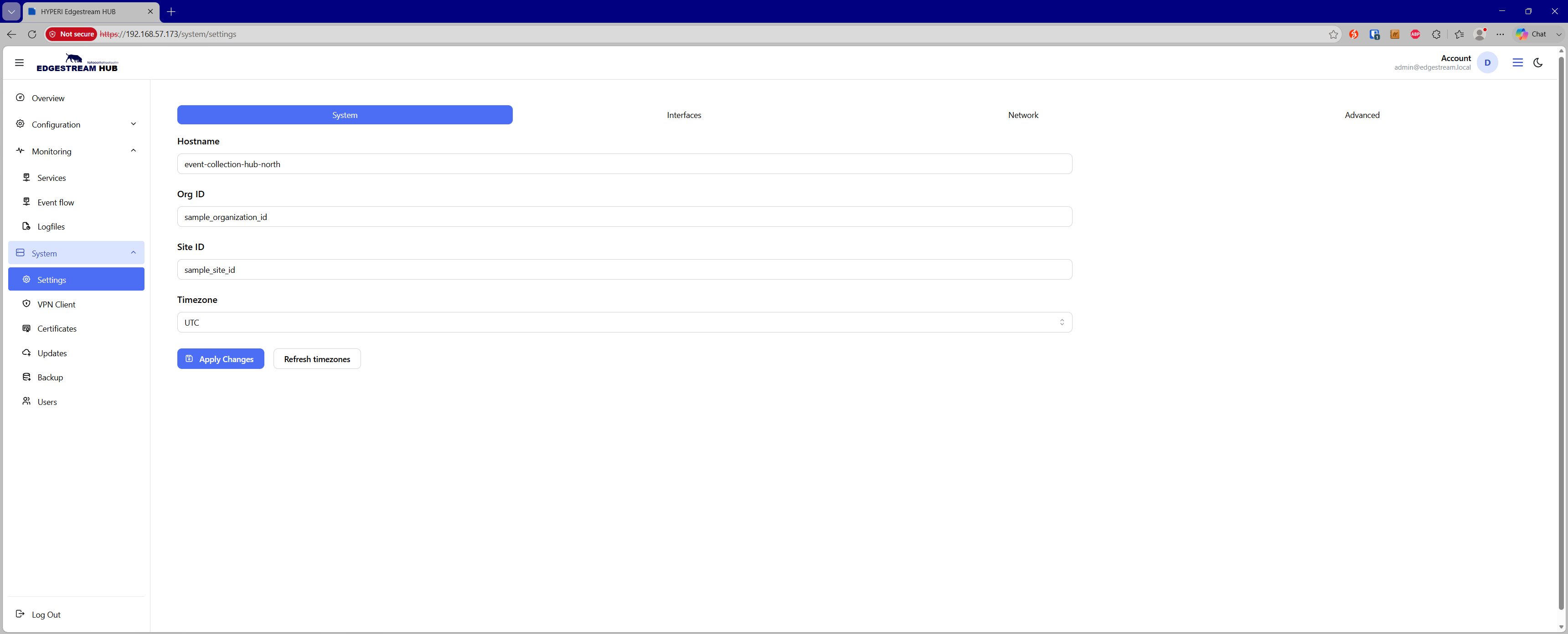
The System Settings page allows administrators to configure core identity and regional parameters for the EdgeStream Hub appliance.
🏷️ Global Event Metadata Enrichment
The parameters configured on this page are globally injected into the metadata of every event processed by the EdgeStream pipeline. This enables consistent multi-tenant routing, organization-level partitioning, and downstream query filtering.
The following metadata fields are appended automatically:
@edgestream.hub.host— Configured appliance hostname@edgestream.hub.organization— Organization identifier@edgestream.hub.id— Deployment site or location identifier@edgestream.hub.event.timezone— Configured system timezone
🔧 Configuration Fields
Administrators can configure the following global settings:
Hostname — The network hostname assigned to the EdgeStream Hub appliance (supports standard alphanumeric and hyphen characters).
Org ID — A unique identifier representing the parent organization or tenant (supports alphanumeric, hyphen, and underscore characters).
Site ID — A unique identifier representing the physical site, branch, or data center location (supports alphanumeric, hyphen, and underscore characters).
Timezone — A searchable dropdown of standard timezones (e.g.,
UTC,Australia/Melbourne) used to standardize timestamp localization across outgoing events.
💾 Applying Changes
Click Apply Changes to commit settings and trigger the background update job.
Click Refresh timezones to re-poll and update the available system timezone database if local environment variables or time libraries change.