🌐 Interface Settings
The Interface Settings page allows administrators to configure IPv4 network parameters for the appliance’s Management and Events network interfaces.
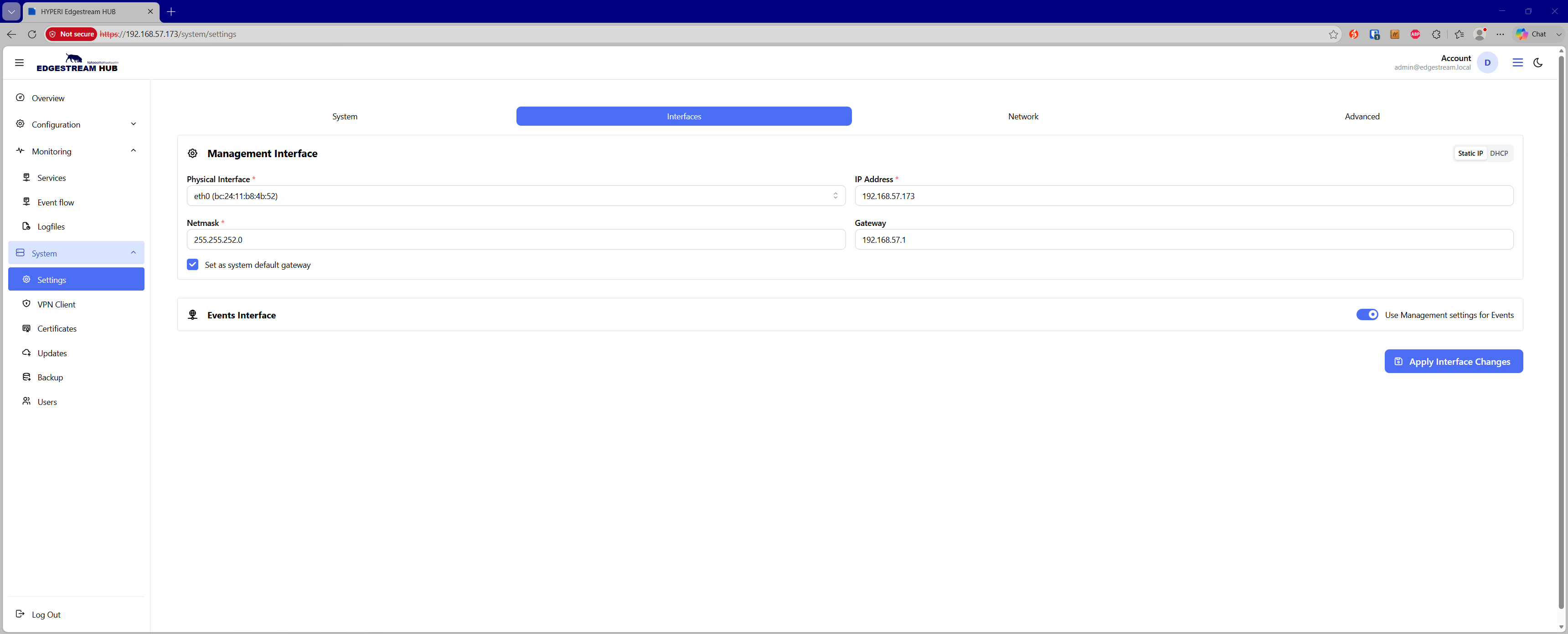
🛠️ Management Interface
The Management Interface handles administrative access, Web UI connectivity, API operations, and system daemons.
Configuration parameters include:
Protocol Mode — Toggle between Static IP or DHCP addressing.
Physical Interface — Select the target physical network device (displays the device name and detected MAC address).
IP Address — The static IPv4 address assigned to the management interface (required in static mode).
Netmask — The subnet mask for the management network (e.g.,
255.255.255.0).Gateway — The default network gateway for management traffic.
Default Gateway Checkbox — Designates the management gateway as the primary system default route.
📡 Events Interface
The Events Interface handles high-volume telemetry ingestion and destination delivery traffic.
Administrators can operate in one of two routing modes:
Unified Interface (Default) — When Use Management settings for Events is enabled, all event pipelines route through the management interface.
Dedicated Interface — When disabled, an independent network adapter can be provisioned to isolate telemetry traffic from management operations.
Dedicated configuration options:
Protocol Mode — Select Static IP or DHCP.
Physical Interface — Select the dedicated physical device for event traffic.
IP Address & Netmask — Independent IPv4 addressing and subnet assignment.
Gateway — Optional dedicated gateway for telemetry routing.
Default Gateway Checkbox — Sets this adapter as the default routing path for outbound event traffic.
💾 Applying Changes
Click Apply Interface Changes to submit the configuration and trigger the network provisioning job.
Warning: Updating IP addresses, subnet masks, or default routes on the management interface may temporarily interrupt your active Web UI session while network adapters restart.