🛠️ Advanced Settings
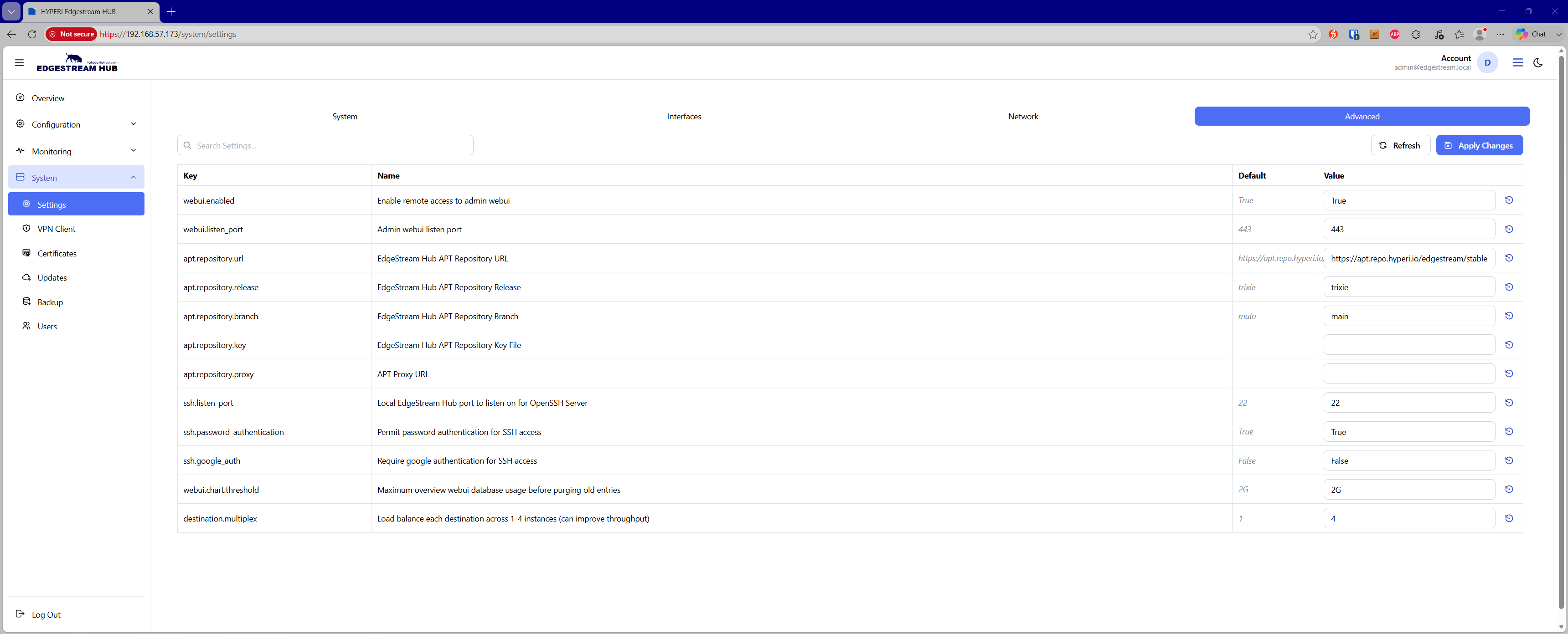
The Advanced Settings page allows administrators to override default system configurations, customize internal package repositories, configure secure remote access, and fine-tune pipeline delivery throughput.
Web UI & Metrics
webui.enabled— Enable or disable remote browser access to the EdgeStream administration console (Default:True).webui.listen_port— The listening port used by the administrative Web UI daemon (Default:443).webui.chart.threshold— Maximum allowable database storage utilization for dashboard metrics before automatic purge policies prune older telemetry (Default:2G).
APT Package Repositories
apt.repository.url— Upstream APT repository endpoint for EdgeStream Hub system and package updates (Default: https://apt.repo.hyperi.io/edgestream/stable ).apt.repository.release— Distribution release target for package updates (Default:trixie).apt.repository.branch— Configured package release branch (Default:main).apt.repository.key— GPG key path or signature used to verify repository package authenticity.apt.repository.proxy— Optional HTTP/HTTPS proxy URL used to route outbound package manager requests.
SSH & Authentication Security
ssh.listen_port— Port on which the OpenSSH server listens for incoming management sessions (Default:22).ssh.password_authentication— Toggle standard password authentication on or off for incoming SSH connections (Default:True).ssh.google_auth— Require Google Authenticator two-factor authentication (2FA) for SSH terminal logins (Default:False).
Pipeline & Delivery Tuning
destination.multiplex— Load balances event egress across 1 to 4 worker instances per configured destination to increase throughput and reduce downstream backpressure (Default:1).